
Download WordService – Fast, Free Text‑Processing Tool for Windows, Mac, Android & iOS
Overview
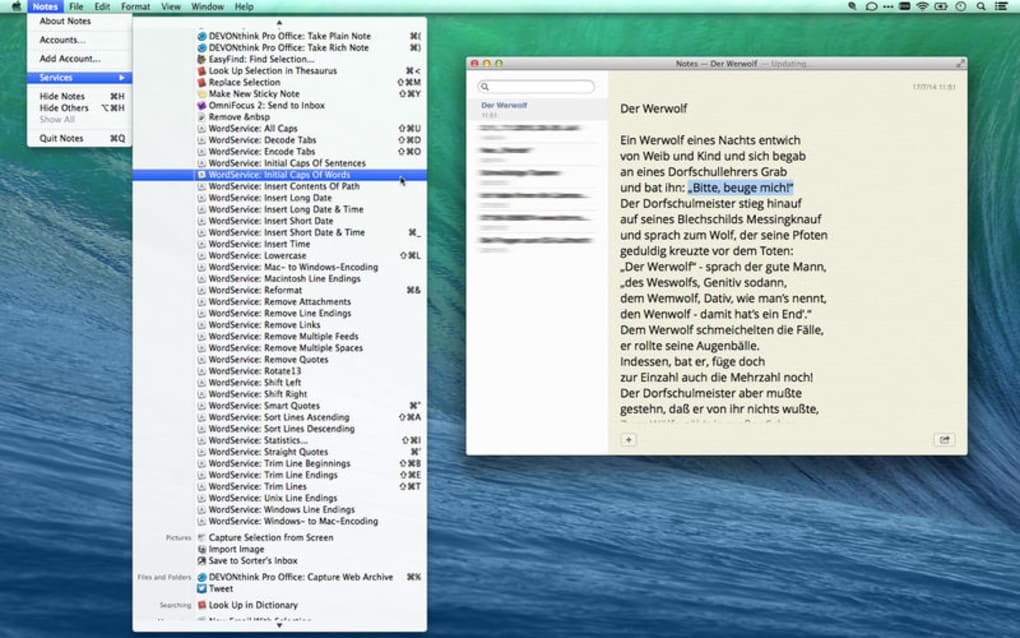
WordService is a lightweight yet powerful text‑processing app designed to turn tedious editing chores into a single‑click experience. Whether you are a developer who constantly cleans log files, a writer polishing drafts, or a power‑user who needs to reformat emails on the fly, WordService equips you with a massive set of shortcut commands that work inside any text‑editing environment – from classic Notepad and VS Code to web browsers and email clients. The core promise of the tool is speed: it instantly reformats paragraphs, removes unwanted fragments, changes case, sorts lines, fixes indentation, cleans up tabs and line endings, and even injects the current time, date, or file path.
All operations are performed without leaving the window you are already using, which means you spend less time copying, pasting, and manually adjusting text. The result is a workflow that saves weeks of cumulative effort over months of ordinary editing. WordService is free to download, secure (no hidden telemetry), and receives regular updates that keep the command list fresh and compatible with the latest operating systems.
If you handle text daily – whether for coding, documentation, research, or casual note‑taking – WordService is the hidden productivity boost you didn’t know you needed.
Powerful Features that Redefine Text Editing
- Smart Reformatting: Instantly normalize paragraph spacing, line breaks, and indentation with a single shortcut.
- Case Conversion: Switch between UPPER, lower, Title Case, or toggle case for selected text blocks.
- Advanced Sorting: Sort lines or numbers alphabetically or numerically, with support for rich‑text formats.
- Cleanup Utilities: Remove stray tabs, extra spaces, line‑ending mismatches (CR/LF), and mismatched quotation marks.
- Dynamic Inserts: Insert the current time, date, or full file path directly into your document.
- Paragraph Capitalization: Automatically capitalize the first letter after line feeds or paragraph separators.
- Universal Compatibility: Works inside any text field – IDEs, browsers, email apps, or plain‑text editors.
- Custom Shortcut Mapping: Define your own hotkeys for any command to fit personal workflow.
- Rich‑Text Support: Preserve formatting while applying transformations to styled documents.
- Zero‑Learning Curve: All commands are exposed via intuitive keyboard shortcuts and a concise reference overlay.
The breadth of these capabilities means you can replace dozens of separate utilities with a single, always‑available app. For example, instead of launching a separate “Sort Lines” script, you press Ctrl+Alt+S and the selected block instantly orders itself. The same principle applies to cleaning up tabs or inserting timestamps – tasks that traditionally required multiple steps are now reduced to a single keystroke. This consolidation not only speeds up daily operations but also reduces context switching, keeping your focus firmly on the content you’re creating.
Installation, Usage Guide & Compatibility
Step‑by‑Step Installation
1. Download the installer from the official WordService website – choose the version that matches your platform (Windows, macOS, Android, or iOS).
2. Run the installer.
On Windows, accept the UAC prompt; on macOS, drag the app into the Applications folder.
3. Allow permissions if prompted – the app needs access to the clipboard and the active window to execute commands.
4. Restart any open text editor to ensure the hotkey listener is active.
5.
Open the reference overlay (usually Ctrl+Shift+?) to view all available shortcuts.
How to Use WordService Effectively
Once installed, WordService runs in the background, listening for predefined key combinations. Select any text in your editor, then press the appropriate shortcut. For example, Ctrl+Alt+U removes duplicate lines, while Ctrl+Alt+T inserts the current timestamp.
If you need a custom command, open the Settings panel (accessible via the system tray icon) and assign a new hotkey to any function listed. The tool also offers a “quick‑command” dialog (Ctrl+Shift+Space) where you can type the command name and execute it without memorizing shortcuts. All changes are performed instantly, with an optional undo buffer that lets you revert the last operation via Ctrl+Z.
Supported Operating Systems (Windows 10/11, macOS 10.15+, Android 7+, iOS 13+)
WordService has been rigorously tested across major desktop and mobile platforms. The Windows version integrates with the Win32 API for low‑latency keystroke detection, while the macOS build uses the Accessibility framework to achieve comparable performance. On Android and iOS, the app appears as a system‑wide service that can be invoked from the keyboard’s shortcut bar, making text manipulation on mobile devices just as fluid as on a desktop. Regular updates ensure that new OS releases remain fully compatible, and the developer provides a public changelog that details bug fixes and added features.
Pros & Cons
- Pros
- Free and regularly updated.
- Works with any text field, no need for separate plugins.
- Huge command set reduces reliance on multiple utilities.
- Lightweight footprint – under 15 MB on all platforms.
- Customizable shortcuts tailor the tool to personal workflows.
- Cons
- Initial learning curve for remembering shortcuts.
- Advanced sorting options require basic knowledge of numeric formats.
- No built‑in cloud sync for custom shortcut profiles (must export manually).
FAQ & Conclusion – Why You Should Download WordService Today
Frequently Asked Questions
Is WordService really free?
Yes, WordService is completely free to download and use. All core features are available without any hidden fees or subscription.
Can I use WordService on a Mac?
Absolutely. WordService provides a native macOS build that works on macOS 10.15 (Catalina) and later.
Does the app collect any personal data?
No. WordService respects user privacy and does not send any clipboard or keystroke data to external servers. All processing happens locally on your device.
How do I customize shortcut keys?
Open the Settings panel from the system tray icon, navigate to the “Hotkeys” tab, and assign any unused key combination to the command of your choice. Changes take effect instantly.
Is there a mobile version for Android and iOS?
Yes. WordService offers dedicated apps for Android (7.0+) and iOS (13+), which integrate with the system keyboard to provide the same shortcut functionality on the go.
In summary, WordService delivers a remarkable boost to anyone who spends time manipulating text. Its extensive command library, zero‑cost model, and cross‑platform reach make it a rare find in the productivity‑tool market. By installing WordService you eliminate repetitive manual edits, cut down on copy‑paste errors, and free up mental bandwidth for higher‑value tasks. Don’t let another paragraph waste your day – download WordService now and experience instant, secure, and free text processing that truly saves weeks of work.







